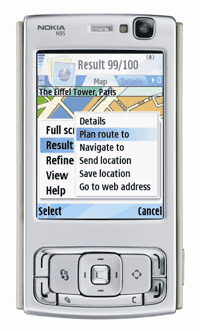
- Conversation - "Conversation is a messaging application that allows you to follow your conversations, organized by individual contacts. In addition, the application provides an easy way for replying to messages, and to continue the conversations."
- Share Online - "Share Online makes it easy to post photos and video from your phone straight to your blog, photo sharing site, or other online community. You can control the file size and quality of your photos and video, add text to your posts, and browse to your page to see how it looks once you`re done."
- Device Status - "Nokia Device Status is a self-diagnosis tool that allows you to collect detailed system information both from your PC and your S60 device. Your current device configuration and phone settings are presented in a detailed summary, which you can use to determine the exact cause, if you run into problems."
Showing posts with label Nokia N95. Show all posts
Showing posts with label Nokia N95. Show all posts
Monday, October 15, 2007
Nokia Beta Labs
In addition to the not so succesful launh of Nseries PC Suite 2.0, Nokia beta labs has recently introduced three great applications:

Sunday, October 14, 2007
Finally - Google Maps with GPS for N95
This is great news for all of us N95 users. The latest version of Google Mobile Maps now supports the internal GPS of N95. To see your location on the map, go to menu and select "Show my location".
To install point your phone's browser to www.google.com/gmm and follow the instructions.
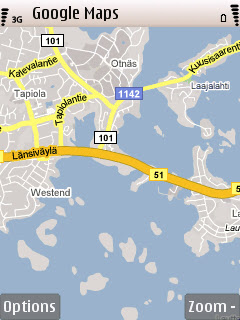

To install point your phone's browser to www.google.com/gmm and follow the instructions.


Tuesday, July 3, 2007
N95 camera - scene settings
I've been playing with the camera settings during the last couple of days. There's something very strange in the way some of the scenes work.
N95 allows you to choose between eight different scenes:
I thought I'd experiment a bit with the scene settings and took photos using Auto, Portrait and Landscape scene. I then compared them in Photoshop to see if there really was something strange. Below is a set of three images with different scene settings: Auto, Portrait and Landscape (from top to bottom).


Most of the time I've been using Auto scene when taking photos with N95 and haven't noticed anything strange. The first image, taken with Auto setting, seems to be as expected.
The second image is taken using Portrait setting. What I'd expect from a Portrait setting is a small depth of field. It usually used when taking photos of a person and you want the person to appear in focus while anything in front or behind the person are blurred. The Portrait photo taken using N95 is completely opposite. It seems sharp all the way from near to far. A closer look tells that a lot of post-processing has been done to sharpen the image.
The third photo was taken using landscape scene. First thing I noticed when taking a photo in landscape scene was that the lens didn't try to focus at all. As you can see from the photo, it has very small depth of field while objects near and far are blurred. Not really what you'd expect in a Landscape mode.
Landscape and Portrait scenes seem to produce unexpected results. It almost seems like the Portrait and Landscape modes should be switched. I thought I had accidentally changed the scene modes in wrong order but when I repeated the experiment (several times) I always got the same result.
N95 allows you to choose between eight different scenes:
- Auto
- User defined
- Close-up
- Portrait
- Landscape
- Sports
- Night
- Night portrait
I thought I'd experiment a bit with the scene settings and took photos using Auto, Portrait and Landscape scene. I then compared them in Photoshop to see if there really was something strange. Below is a set of three images with different scene settings: Auto, Portrait and Landscape (from top to bottom).


Most of the time I've been using Auto scene when taking photos with N95 and haven't noticed anything strange. The first image, taken with Auto setting, seems to be as expected.
The second image is taken using Portrait setting. What I'd expect from a Portrait setting is a small depth of field. It usually used when taking photos of a person and you want the person to appear in focus while anything in front or behind the person are blurred. The Portrait photo taken using N95 is completely opposite. It seems sharp all the way from near to far. A closer look tells that a lot of post-processing has been done to sharpen the image.
The third photo was taken using landscape scene. First thing I noticed when taking a photo in landscape scene was that the lens didn't try to focus at all. As you can see from the photo, it has very small depth of field while objects near and far are blurred. Not really what you'd expect in a Landscape mode.
Landscape and Portrait scenes seem to produce unexpected results. It almost seems like the Portrait and Landscape modes should be switched. I thought I had accidentally changed the scene modes in wrong order but when I repeated the experiment (several times) I always got the same result.
Tuesday, June 19, 2007
Opera Mini 4 beta available
You can download Opear Mini 4 beta from the Opera website. Compared to the earlier versions of Opera Mini, the new version shows you first a full page preview and allows you to select where you want to zoom in.
One of the great features of Opera Mini is that it's fast. Opera Mini compresses data on the server side before sending the data. That reduces the total amount of data sent and makes the pages load quicker. Less sent data also means less data charges for you.
More information about the features of Opera Mini 4 beta can be found here.
Today I tested Opera Mini 4 beta on N95. It's still beta so I don't want to go too much into the details. Downloading and installing it was very easy. The first time I tried to use it, I had an error message saying it couldn't connect to the internet. The second time it worked just fine. I really liked the functionality and feel of the new version and it is fast. Hopefully, Opera is going to release the final version soon. The three pictures below show the startup screen, the new full page preview and the zoomed in version of the Google web page.


One of the great features of Opera Mini is that it's fast. Opera Mini compresses data on the server side before sending the data. That reduces the total amount of data sent and makes the pages load quicker. Less sent data also means less data charges for you.
More information about the features of Opera Mini 4 beta can be found here.
Today I tested Opera Mini 4 beta on N95. It's still beta so I don't want to go too much into the details. Downloading and installing it was very easy. The first time I tried to use it, I had an error message saying it couldn't connect to the internet. The second time it worked just fine. I really liked the functionality and feel of the new version and it is fast. Hopefully, Opera is going to release the final version soon. The three pictures below show the startup screen, the new full page preview and the zoomed in version of the Google web page.


Sunday, June 17, 2007
Fring on N95
 I finally had some extra time to test how Fring works on N95. I installed it already some time ago but never had the time to fully test it. Fring is a free VoIP(Voice-over-Internet Protocol) software that runs on Nokia mobile phones. You can use Fring to talk or IM (instant message) to other mobile phones and PC-based Skype, Google Talk, MSN Messenger, SIP or Twitter users. Sounds great but does it really work?
To download Fring, go to www.fring.com/download, select your phone model, fill in the requested information (country, mobile number and email address) and press "Join". In a few seconds you'll receive an SMS. Open the SMS , click on the link and follow the instructions to install the software. The installation and setup took about five minutes and was very easy. I set up Fring to use my Skype account for making calls. During the setup process most of the time was spent trying to remember what my Skype password was. Other than that, the set up was very simple. To be able to test it at home, I chose my home WLAN network as a connection point.
After everything was set up, fring showed a list of contacts that it imported from my Skype account and from my phone contacts. I selected one of the Skype contacts and made a test call. The call was answered and everything seemed to work. You can also enable the loudspeaker mode. The audio quality is OK but not as good as you get when using Skype on PC.
Fring is a really great application - and it's completely free. If you have access to free wireless network, Fring gives you the opportunity to talk to other VOIP users completely free. There are lots of free WLAN hotspots around the world. It's nice to know that whenever you are in the area of a free WLAN hotspot, you have the possibility to make free VoIP calls.
One warning though. If you think your N95 has a short battery life, using applications such as Fring can make the battery life even shorter. Extensive use of Fring can eat up a lot of battery power - just like any use of wireless data connection.
Saturday, June 16, 2007
N95 camera review (part 1)
It's very handy to have a camera in a cell phone. The 5 megapixel camera of N95 takes decent photos but how does it compare to digital cameras. It would be unfair to compare it to SLRs with expensive lenses. Therefore, I decided to compare it to a pocket size digital camera with the same 5 megapixel resolution. Samsung L55W is a small digital camera with a wide angle lens and a 4.8x optical zoom. Let's see how the N95 camera compares to L55W.
The two photos below were taken at the same location. I tried to get the optical zoom to match the zoom level of N95 but didn't get it quite right but it's close enough. The first image is taken with N95 and the second one is taken with L55W. These photos are used as an example to show how the Nokia N95 performs against the Samsung L55W. These images were taken under good lighting conditions. The differences between these two cameras become even clearer when lighting conditions become worse.


The first big difference is the file size. Both cameras were set to automatic exposure and best image quality and both have 5 megapixels. While the file size of the image taken with N95 is only about 1 MB, the image taken with L55W is almost 2.4 MB. That's a huge difference hinting that the image taken with L55W is likely to contain more detail. You can click on the images to see them in full resolution.
There's also a quite a big difference in the overall tone of the image. The N95 seems to produce warmer tones. And even though the software update improved it a lot, the N95 still suffers a bit from producing images that are slightly red tinted.
Next, let's take a look at how well these two cameras capture the small details. Below are two examples with the N95 image on the left and the L55W image on the right. First is a detail from the lower left hand corner of the original image where you can see some leaves of the tree. The second image is a detail of the plant and water on the right. A big difference in both of these details. The N95 doesn't really preserve the details very well. The leaves are blurred and in many places it looks like it's been painted using water colors. The L55W captures the details much better.


The last example is a detail of the sky. Again the N95 image on the left and the L55W image on the right. Ideally the sky should be very uniform color with a smooth gradient. The N95 image seems to have a lot more noise or at least the noise is much more visible. By looking at the histograms of the two images, it becomes clear the there is more noise in the image on the left, i.e. the image taken with the N95. The reason for this is also obvious. The small lens of a cell phone camera simply can't collect the same amount of light as a bigger lens of a real digital camera.
A more careful analysis of the image reveals that the N95 image has more noise than the L55 image on all color components (red, green, blue). The red component of the N95 image has the most noise. Maybe this is what makes the image appear red tinted? If you look at the image, it seems like it's filled with red tinted spots.

As a conclusion it can be said that the N95 camera doesn't produce the same quality as a normal pocket sized digital camera. The L55W is a clear winner of this comparison. The N95 doesn't capture all the details, produces more noisy images and suffers from red tinting. The noise reduction algorithm makes some parts of the image look like water color painting. Having said that, these become a problem only if you look at the full 5 megapixel resolution or print in large format. The images taken with N95 are good for printing in the standard 10 cm x 15 cm (4''x6'') format. And it's still the best digital camera I've ever had in a cell phone.
The two photos below were taken at the same location. I tried to get the optical zoom to match the zoom level of N95 but didn't get it quite right but it's close enough. The first image is taken with N95 and the second one is taken with L55W. These photos are used as an example to show how the Nokia N95 performs against the Samsung L55W. These images were taken under good lighting conditions. The differences between these two cameras become even clearer when lighting conditions become worse.


The first big difference is the file size. Both cameras were set to automatic exposure and best image quality and both have 5 megapixels. While the file size of the image taken with N95 is only about 1 MB, the image taken with L55W is almost 2.4 MB. That's a huge difference hinting that the image taken with L55W is likely to contain more detail. You can click on the images to see them in full resolution.
There's also a quite a big difference in the overall tone of the image. The N95 seems to produce warmer tones. And even though the software update improved it a lot, the N95 still suffers a bit from producing images that are slightly red tinted.
Next, let's take a look at how well these two cameras capture the small details. Below are two examples with the N95 image on the left and the L55W image on the right. First is a detail from the lower left hand corner of the original image where you can see some leaves of the tree. The second image is a detail of the plant and water on the right. A big difference in both of these details. The N95 doesn't really preserve the details very well. The leaves are blurred and in many places it looks like it's been painted using water colors. The L55W captures the details much better.


The last example is a detail of the sky. Again the N95 image on the left and the L55W image on the right. Ideally the sky should be very uniform color with a smooth gradient. The N95 image seems to have a lot more noise or at least the noise is much more visible. By looking at the histograms of the two images, it becomes clear the there is more noise in the image on the left, i.e. the image taken with the N95. The reason for this is also obvious. The small lens of a cell phone camera simply can't collect the same amount of light as a bigger lens of a real digital camera.
A more careful analysis of the image reveals that the N95 image has more noise than the L55 image on all color components (red, green, blue). The red component of the N95 image has the most noise. Maybe this is what makes the image appear red tinted? If you look at the image, it seems like it's filled with red tinted spots.

As a conclusion it can be said that the N95 camera doesn't produce the same quality as a normal pocket sized digital camera. The L55W is a clear winner of this comparison. The N95 doesn't capture all the details, produces more noisy images and suffers from red tinting. The noise reduction algorithm makes some parts of the image look like water color painting. Having said that, these become a problem only if you look at the full 5 megapixel resolution or print in large format. The images taken with N95 are good for printing in the standard 10 cm x 15 cm (4''x6'') format. And it's still the best digital camera I've ever had in a cell phone.
Monday, May 28, 2007
Camera - introduction
I'm preparing a full review of the N95 camera functionality and image quality. Here's just some first impressions.
The N95 has a main camera with a 5 Megapixel sensor and Carl Zeiss Optics. The main camera is capable of capturing stills as well as videos. There's also a second, lower resolution camera for video calls. So in paper it looks really good. How does it perform in reality?
Below is an image taken with N95 using the best image quality settings. Click on the image to view a slightly larger version. The image has not been processed in any way. It has just been scaled down to reduce resolution. It was a clear and sunny day so the lighting conditions were good. If you don't look at the image at full resolution (100% magnification) it looks good. The color balance is good (with the latest firmware).
If you look at 100% magnification, then you start seeing the true image quality. The second image is a detail taken from the original 5 Megapixel image. There you can see the biggest problem with the N95 camera. It seems like the noise reduction algorithm is too aggressive. It blurs the details too much (look at the leaves). It would be interesting to know how noisy the original image is. It would be great to be able to control the amount of noise reduction.
Other than that, the first impression of the image quality is good. Not bad for a cell phone.


The N95 has a main camera with a 5 Megapixel sensor and Carl Zeiss Optics. The main camera is capable of capturing stills as well as videos. There's also a second, lower resolution camera for video calls. So in paper it looks really good. How does it perform in reality?
Below is an image taken with N95 using the best image quality settings. Click on the image to view a slightly larger version. The image has not been processed in any way. It has just been scaled down to reduce resolution. It was a clear and sunny day so the lighting conditions were good. If you don't look at the image at full resolution (100% magnification) it looks good. The color balance is good (with the latest firmware).
If you look at 100% magnification, then you start seeing the true image quality. The second image is a detail taken from the original 5 Megapixel image. There you can see the biggest problem with the N95 camera. It seems like the noise reduction algorithm is too aggressive. It blurs the details too much (look at the leaves). It would be interesting to know how noisy the original image is. It would be great to be able to control the amount of noise reduction.
Other than that, the first impression of the image quality is good. Not bad for a cell phone.


Saturday, May 26, 2007
Screenshots
There's a really great tool by Anthony Pranta for capturing screenshots on Symbian OS (S60) phones. I downloaded and installed it today. The current version for Symbian OS (S60 3rd edition) is 2.60. The screenshot tool works great on N95. By pressing <EDIT>+<OK> you can capture whatever is on your screen (In N95, the <EDIT> key is the "pencil" key). The tool is completely free and supports multiple languages. In the options you can change the settings of the screenshot tool:
1. Capturing mode:
5. Filename
6. Directory
7. Delay of first shot
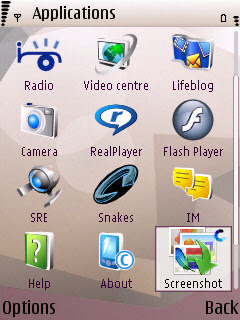
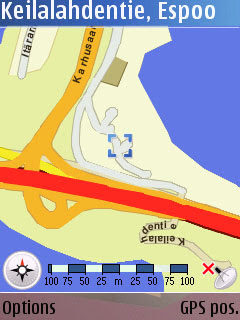
Below are two sample screenshots captured with the screenshot tool. The first one is the Applications menu with thesScreenshot tool icon highlighted. The second screenshot is showing the approximate location of Nokia headquarters in Espoo, Finland as shown in the Maps application.
1. Capturing mode:
- one shot only
- every 1 seconds
- every 2 seconds
- every 5 seconds
- every 10 seconds
- <EDIT>+<OK>
- <EDIT>+<+<*>
- <EDIT>+<+<#>
- JPEG high quality
- JPEG normal quality
- JPEG low quality
- PNG default compression
- PNG smallest size
- PNG best speed
- BMP 24 bits/pixel
- BMP 8 bits/pixel
- MBM 24 bits/pixel
- MBM 8 bits/pixel
5. Filename
6. Directory
7. Delay of first shot
- No delay
- 1 second
- 5 seconds
- 10 seconds
- 30 seconds
Below are two sample screenshots captured with the screenshot tool. The first one is the Applications menu with thesScreenshot tool icon highlighted. The second screenshot is showing the approximate location of Nokia headquarters in Espoo, Finland as shown in the Maps application.


Wednesday, May 23, 2007
Firmware update
Last month a new firmware for N95 was released:
Version 11.0.026
17-04-2007
RM-159
A complete changelog can be found at allaboutsymbian.com.
The earlier firmware version was 10.0.018.
Updating the firmware was easy. Just go to http://europe.nokia.com/softwareupdate, select N95 from the list and follow instructions. Remember to back up your data and settings before performing the firmware update.
Was it worth updating?
Many of the improvements/fixes are invisible to an average user. Some of the most noticeable improvements were made for the camera. With the previous firmware, images taken with the N95 seemed to be red/pink tinted. The new firmware seems to have fixed this. Take a look at this comparison of pictures taken with new and old firmware. So was it worth updating - yes. The camera improvements alone made it worth updating. In addition you get quite a few bug fixes.
There have been some rumors that a new firmware upgrade is coming soon. I guess we'll just have to wait and see.
Version 11.0.026
17-04-2007
RM-159
A complete changelog can be found at allaboutsymbian.com.
The earlier firmware version was 10.0.018.
Updating the firmware was easy. Just go to http://europe.nokia.com/softwareupdate, select N95 from the list and follow instructions. Remember to back up your data and settings before performing the firmware update.
Was it worth updating?
Many of the improvements/fixes are invisible to an average user. Some of the most noticeable improvements were made for the camera. With the previous firmware, images taken with the N95 seemed to be red/pink tinted. The new firmware seems to have fixed this. Take a look at this comparison of pictures taken with new and old firmware. So was it worth updating - yes. The camera improvements alone made it worth updating. In addition you get quite a few bug fixes.
There have been some rumors that a new firmware upgrade is coming soon. I guess we'll just have to wait and see.
Monday, May 21, 2007
More about batteries
When my N95 was new I found out a way to increase the battery life. At first the battery was only lasting for one day. I thought I'd try something. One day after charging the phone I used the phone for a couple of minutes (use camera, read emails or whatever) just to reduce the battery charge a little bit. Then I plugged it back in and it started to charge again. I thought it would stop charging very quickly but no - it went on for half an hour or so. After the extra charging treatment the battery lasted for two days instead of one day.
I'm not an expert on batteries. I don't know what happened or why and I don't know if it can damage the battery in some way, so I can't recommend anyone to try the same. Anyway, after doing the "charge - use a couple of minutes - charge" cycle a couple of times within one week it seemed like the battery was taking much more charge and lasted longer. I'm not sure if it was that or if the battery just needs to be charged 5, 10 or 20 times before it reaches its maximum capacity. It worked for me though. Now the battery lasts for at least two days and if I don't use it a lot I get three days out of it.
Oh, and I have bluetooth always on but WLAN off.
One more thing. If you connect your phone to your computer using the USB cable, don't forget to unplug it after you've finished. Having the USB connected seems to draw a lot of juice out of the battery. At first, I thought you might be able to charge the phone using the USB cable. Wrong, it seems to do the exact opposite.
 Talking about USB and batteries, there's a handy USB charger from Nokia (CA-100).
I'm not an expert on batteries. I don't know what happened or why and I don't know if it can damage the battery in some way, so I can't recommend anyone to try the same. Anyway, after doing the "charge - use a couple of minutes - charge" cycle a couple of times within one week it seemed like the battery was taking much more charge and lasted longer. I'm not sure if it was that or if the battery just needs to be charged 5, 10 or 20 times before it reaches its maximum capacity. It worked for me though. Now the battery lasts for at least two days and if I don't use it a lot I get three days out of it.
Oh, and I have bluetooth always on but WLAN off.
One more thing. If you connect your phone to your computer using the USB cable, don't forget to unplug it after you've finished. Having the USB connected seems to draw a lot of juice out of the battery. At first, I thought you might be able to charge the phone using the USB cable. Wrong, it seems to do the exact opposite.
 Talking about USB and batteries, there's a handy USB charger from Nokia (CA-100).
Subscribe to:
Posts (Atom)

