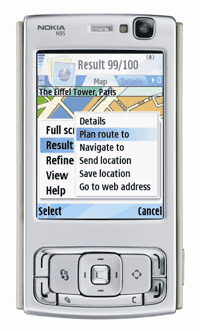
Nokia Maps is taking maps and navigation experiences to the next level and introducing Walk - pedestrian navigation, in addition to Drive - world class car navigation, multimedia city guides, satellite maps and other innovative features. With free maps of more than 150 countries, over 15 million points-of-interest, the world is in your pocket. Don't get lost or choose to get lost in the right places to explore, and let Nokia Maps show you the way.
Showing posts with label maps. Show all posts
Showing posts with label maps. Show all posts
Monday, February 11, 2008
Nokia Maps 2.0 available
Nokia Maps 2.0 beta has been announced today at Mobile World Congress. This is a great update for Nokia Maps application. It's still beta and therefore not supported by Nokia Care. For more information read Ricky's preview on symbian-guru.com. To download, visit Nokia Beta Labs.

Friday, August 31, 2007
Nokia Maps
Nokia Maps 1.0 has been made available for most of the S60 N- and E-series devices. With this version you get free 3 day trial of voice guidance. There's also a new version of Nokia Map Loader available for download (version 1.2).
To download Nokia Maps or Nokia Map Loader go to Nokia Maps.
To download Nokia Maps or Nokia Map Loader go to Nokia Maps.
Monday, July 9, 2007
New firmware and GPS
I've now tested the new firmware (12.0.0.013) for a couple of days. I've always said that having a phone with integrated GPS is great but I've also criticized how slow the GPS acquired satelite lock. The new firmware with Assisted GPS support is a huge improvement.
I have been testing the GPS quite a lot during the last two days. Lock to satelites is acquired very quickly, even inside a car. When starting the Maps while driving a car, it takes on average less than 30 seconds to lock to satellites. In similar conditions with the previous firmware version it usually took more than 10 minutes. What an improvement! No more critisism about long waiting times before the GPS is operational.
Before the firmware was officialy released there were rumors that it would also include a new version of Maps application. The version of new Maps is not included in this FW update. I guess we'll have to wait a bit longer for the new Maps.
I have been testing the GPS quite a lot during the last two days. Lock to satelites is acquired very quickly, even inside a car. When starting the Maps while driving a car, it takes on average less than 30 seconds to lock to satellites. In similar conditions with the previous firmware version it usually took more than 10 minutes. What an improvement! No more critisism about long waiting times before the GPS is operational.
Before the firmware was officialy released there were rumors that it would also include a new version of Maps application. The version of new Maps is not included in this FW update. I guess we'll have to wait a bit longer for the new Maps.
Monday, June 18, 2007
New version of MapLoader
There is a new version (1.1) of MapLoader on Nokia web-site. There have also been reports that a new (beta) version of Maps application for N95 was available for download on smart2go.com.
The N95 version doesn't seem to be there anymore but there's a thread on AllAboutSymbian forum where you'll find a link to the the N95 version of Maps. It's beta so try it at your own risk. There are also changes to the functionality. There are many improvements but you may also find some negative surprises. Especially the removal of tracking functionality has been a surprise to many.
The N95 version doesn't seem to be there anymore but there's a thread on AllAboutSymbian forum where you'll find a link to the the N95 version of Maps. It's beta so try it at your own risk. There are also changes to the functionality. There are many improvements but you may also find some negative surprises. Especially the removal of tracking functionality has been a surprise to many.
Thursday, May 24, 2007
GPS and maps
It's a great feature to have a built-in GPS receiver. Having used many SIRFstar III equipped GPS devices, I guess I've been spoiled. SIRFstar III is known for its fast Time to First Fix (TTFF) and its ability to acquire and maintain a signal lock even indoors. When you start the Maps application in N95, it takes quite a long time before it acquires a signal lock.
What's really great about N95 is that you can download all the maps you need for free. Just go to smart2go.com and download the Nokia Maploader. Use maploader to download maps and store them on a microSD memory card. That way your phone doesn't need to use the network to download maps saving your data charges. It also saver battery life.
You can search for an address or enter the starting point and end point and the N95 will find a route. If you plan to use it as a car navigator with turn-by-turn instructions, you have to pay for a subscription service. Except for the turn-by-turn navigation, there are no other subscription fees. The Maps application is easy to use. You can pan, zoom in/out and change between 2D and 3D views.
The points of interest (POI) database that comes with the maps is very good and you can search for things nearby. The POIs are grouped into dozens of categories and in the settings, you can choose which categories are shown on the map.
In conclusion, the N95 doesn't quite offer the performance of dedicated GPS navigators. However, it's great to have a GPS device with you at all times. Having said that, I'll still keep my Garmin Nüvi.
What's really great about N95 is that you can download all the maps you need for free. Just go to smart2go.com and download the Nokia Maploader. Use maploader to download maps and store them on a microSD memory card. That way your phone doesn't need to use the network to download maps saving your data charges. It also saver battery life.
You can search for an address or enter the starting point and end point and the N95 will find a route. If you plan to use it as a car navigator with turn-by-turn instructions, you have to pay for a subscription service. Except for the turn-by-turn navigation, there are no other subscription fees. The Maps application is easy to use. You can pan, zoom in/out and change between 2D and 3D views.
The points of interest (POI) database that comes with the maps is very good and you can search for things nearby. The POIs are grouped into dozens of categories and in the settings, you can choose which categories are shown on the map.
In conclusion, the N95 doesn't quite offer the performance of dedicated GPS navigators. However, it's great to have a GPS device with you at all times. Having said that, I'll still keep my Garmin Nüvi.
Subscribe to:
Posts (Atom)

